
Running a Local LLM Stack
What do you do once you buy hardware?
In my previous post I talked about what it took to build an inference machine from scratch:

.
In this post, I’ll be talking about how to actually put that machine to work and gaining value out of it.
What you have to remember with the whole AI thing is that the hardware and software are tied very closely together so all your decisions have to be coherent with each other.
To exemplify what I mean by that, let’s take the build I have. It is:
A NVIDIA GPU (meaning strong CUDA compatibility)
A RTX 6000 PRO MAX-Q (Blackwell class of chips)
What this means is that I need software that supports both of these specific hardware specifications. I’ll outline what these mean by explaining the core layers of the AI stack.
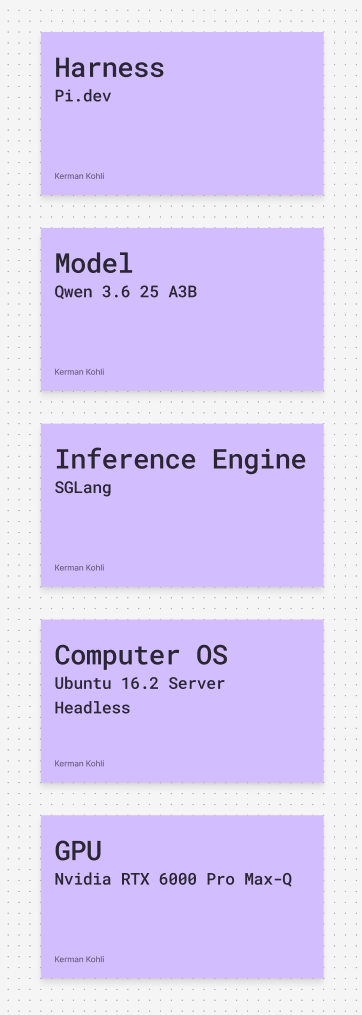
GPU
This is probably the most important choice you make when thinking through your local AI/LLM setup as it will dictate EVERY layer above. Your base choice will narrow your above layers significantly and has to be taken very seriously. At a high level, people debate with the following choices:
Premium NVIDIA GPU (RTX 6000)
Older NVIDIA GPU (3090/4090)
AMD GPU
Apple MLX (Mac Studio/Ultra/MBP)
Apple + eGPU combo?
Some weird Intel shit
Whatever you do, don’t choose the last option, please. The most critical factor in my decision making process was that I wanted speed. I don’t want to have to wait for my LLM to do work at 10-15 token/second since I need 3-5 parallel sessions for about 1-2 concurrent users that can CHURN through work. As a result, memory bandwidth and memory capacity were my top priorities.
Apple (Studio/Ultra/whatever you want) have a high memory capacity but a terrible when it comes to speed. The Unified Memory architecture is kind of good, especially on MLX optimized models. However, by choosing Apple you are locking yourself into a narrow ecosystem. The other challenge with Apple is THEY DO NOT MAKE GOOD SERVERS. I have a Mac Mini I’ve tried using as MacOS a remote server and wow does it suck. If you want a proper server you need Ubuntu/Linux (which you do so your services can rely on it).
That left me down to my last choice, which was a NVIDIA GPU (hello King). My last doubt was an older generation 3090 or the best in-class? I thought carefully about this as well. Upsides of a 3090 (2020 GPU with 24GB of VRAM) was that it was: a) Cheap ($1k) b) Has NV-LINK which means you can link two together and get very high interconnect speeds across 48GB of VRAM
However, the downside is that all AI-inference is memory bound and having less VRAM is a major bottleneck. I want to run the absolute best possible models I can and not feel bottlenecked. Also power is a big consideration. Two 3090s will draw a lot more power than a single RTX 6000 Pro Max-Q. If my GPU is only drawing 300W max (in exchange for 10-15% less performance) I’ll take that trade-off.
Hence, I bit the bullet and purchased the best consumer grade CPU money can buy. Also remember, buying quality in the AI age will also ensure that you don’t lose money. 3090s (a 5 year old GPU) are now selling for the same cost as they did when they first came out.
One last note, an RTX 6000 is part of the Blackwell series which means it has certain optimizations (NVFP4) that you can take advantage of. Older GPUs do not have that. However, you pay a price for Blackwell as you’ll learn later on.
Computer OS
I touched on this briefly but whatever you do, please do not run Windows on any of this stuff. Linux-based kernels are the only way to go. The only question is which way you go for your OS. At a high level your possible options are:
Ubuntu Headless (no UI)
Ubuntu Desktop (has UI)
Mac OS
When building your AI box you basically want it as something that you press the “on” button and never touch again. Management of it should be done entirely remotely with no hands-on requirements. This is why Mac is terrible. Remotely managing one is a PITA. Remote SSH stops working randomly, reboot recovery isn’t strong. You are signing up yourself for a world of pain if you decide to go with Mac. This AI machine is meant to be a part of your personal sovereign intelligence infrastructure and you want to treat it as something you can rely on across many mediums and applications!
If it isn’t clear by now, Ubuntu is the recommended choice. Without a UI is the winning option since with a UI you are going to use a few GB of VRAM which, give how scarce it is, you wan to get the absolute most out of.
Okay so if you’re going to run a compute without a UI how do you manage it effectively? Tailscale! Add it to your sovereign kingdom and then SSH into it from your Mac or whatever and start getting to work!
Inference Engine
I got tripped up on this step a lot harder than I thought I would. At a high level, there are three inference engines that are popular in the open source community:
Llama.cpp (the stripped down version of Ollama)
vLLM
SGLang
Personally I spent maybe 5 hours messing around with all 3 trying to understand what the difference is. Ollama is what everyone says you should start with but you absolutely should not. It is the most in-efficient thing I have come across and would recommend you stay clear from. Llama.cpp is the more interesting choice and what people with more basic hardware typically run.
Now, this is where your hardware matters again! The Blackwell chips need special inference software that make use of their special capabilities. vLLM doesn’t support Blackwell (at least when I was using it) and LLama is terrible with concurrency (multiple chat sessions). SGLang was the clear choice here as it had SIM120 (Blackwell) support and was the optimal choice for my hardware.
The above is highly dependent on what your underlying GPU is and why I mentioned from the start that your hardware will determine all of your downstream choices.
One thing I really liked about SGLang as well is a ML optimization technique it uses called Paged Attention where your past prompts and codebase that you’re executing against is cached making each incremental prompt much smaller in its memory footprint and BLAZING fast to get results back on. If you have two people doing similar kind of work you can get a lot more concurrency than you’d think out of it.
Model
Surely you say “I want to run Qwen” and it all works. Wrong. Your next challenge is figuring out what model parameter count you want, whether you’re going to be using a full model or a MoE model, how large you want your KV cache to be, what kind of concurrency you want and what quantization you are okay with.
Explaining what all of the above means is a rabbit hole I spent another 10-20 hours down which was fun but also mentally exhausting. Another unexpected thing I learned was that certain inference engines don’t support certain models well! So you end up having a three way dependency between:
GPU
Model
Inference engine
That’s why I keep going on about the fact everything has to work in perfect unison and be planned effectively from the start. I kinda winged it and gave myself margin of error by buying top of line hardware.
In the end, I settled on Qwen3.6 35B A3B (no quant) running on SGLang with something that comfortably gives me very fast results. Compared to a Mac this will blow it away. Ignore the screenshot that says Qwen3.5.
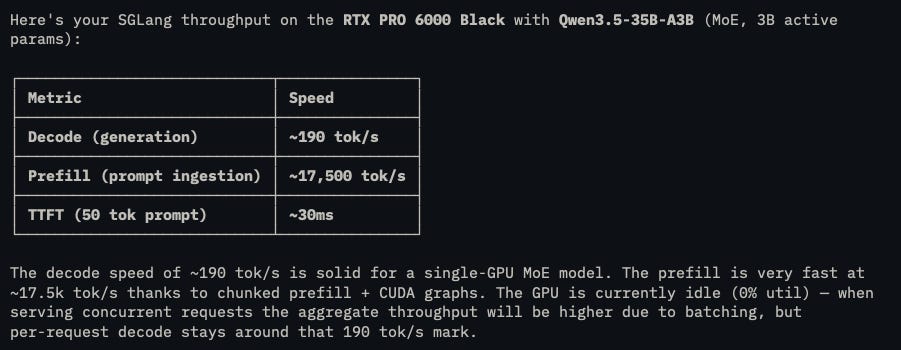
The other to be mindful of when setting this up is you have to set your reasoning parser correctly otherwise your harness won’t be able to utilize the model correctly.
Harness
You thought we’re done? Not at all. The path of sovereignty is one of self-education and decisions at each point. Now, you could technically use Claude Code and point it to your local model but that’s not it.
Your harness needs to be able to adapt to your local hardware stack. After all, hardware is king and software is the slave that works. If that is violated then you’re too deep in someone else’s ecosystem brother.
By this stage, I think I’ve tried and cycled through every harness on the market. Claude Code, Codex, Opencode, Zed, Amp -- you name it. However, there is one that I feel like I have found for life:
https://pi.dev/
It is fully open source and is meant to be incrementally built upon. It does not come with bells and whistles like MCP etc. However that’s by design. You have a rich library ecosystem that further builds upon it and you can get it to what you want it to be.
However, what’s really neat about pi is how easy it is to cycle between different models and orchestrate between them. If you aren’t on pi already you probably should be!
Closing
Okay that’s about all I’ve got for this article. Is this setup better than frontier Codex? Absolutely not. I’d say it’s maybe 60-70%?
However, I fully own it and it runs at the marginal cost of electricity.
I am never rate-limited.
I can do whatever I want.
My ideas stay as mine.
When I need access to frontier intelligence, I will selectively use it and pay the premium then move back to my walled garden.
Compute owners will be the new wealth class moving forward and those who are reliant on someone else’s compute will bleed money as the cost of compute inflation keeps on face. H100 rental index prices have gone up by 50% in the last 180 days alone (lower end).
You need to put in the hard work to orchestrate your own intelligence before its too late and everyone wakes up to this fact and is scrambling too.
Happy tinkering and building everyone, I hope this was helpful!